
Weglot & SEO
Set up Weglot widget for SEO optimization
(Subdomain integration)
Weglot & SEO: Why technical implementation is crucial for your visibility
If you want to offer your website in multiple languages, a simple text translation is not enough. In order for Google and other search engines to index your content, it must be delivered in a technically correct manner. This is exactly where Weglot comes in—and clearly sets itself apart from many alternative solutions or automatically integrated translation widgets.
Weglot generates a separate, indexable URL structure (subdomains) for each language, for example:
- yourdomain.com
- yourdomain.com
- yourdomain.com
These subdomains comply with the official best practices for international SEO, as recommended by Google. This gives each language version its own presence in the search results, allowing people abroad to actually find your content. In other words, without a separate URL (or separate directory), your translated page remains virtually invisible to search engines .
In addition, Weglot automatically integrates hreflang tags into your website's source code. This ensures that search engines understand which language version should be displayed to which user. Your German-speaking audience will continue to see your main page, while visitors from the UK, US, or Australia will be automatically redirected to the English version—a clear advantage for user experience and reach.
Another plus point: as soon as you change content on your original page, it is automatically synchronized and updated in the other languages. This prevents duplicate content, outdated texts, or SEO losses due to inconsistent content.
In short:
With Weglot, you don't just get translations—you get an internationally SEO-friendly structure that makes your website visible worldwide.
It is precisely this technical difference that determines whether your multilingual website will be found and successful abroad—or disappear into Google nirvana.
Tutorial: SEO-friendly setup of the Weglot translation widget on a Jimdo website
Important: For this integration method you need a domain hosted on an external server! If you have your domain managed directly by Jimdo, you will not be able to make any DNS (Domain Name Service) settings. (Domain Name Service) settings. If you have set it up this way, you should move the domain to an external provider that allows its own DNS management and then re-install your website. and then reconnect your website to the domain.
Step-by-step instructions (HowToDo):
Set up your own domain (external provider: Strato)


Connect Domain (DNS Settings)

Set up A-Record

Set up an e-mail address

Set up a free account with Weglot
Weglot Asset

Register Your Weglot Account

Weglot: Set up project and
Make DNS settings

...Weglot waits for DNS settings on domain level (subdomain)

Set up sub-domain (domain provider)
Set CNAME record(websites.weglot.com.)
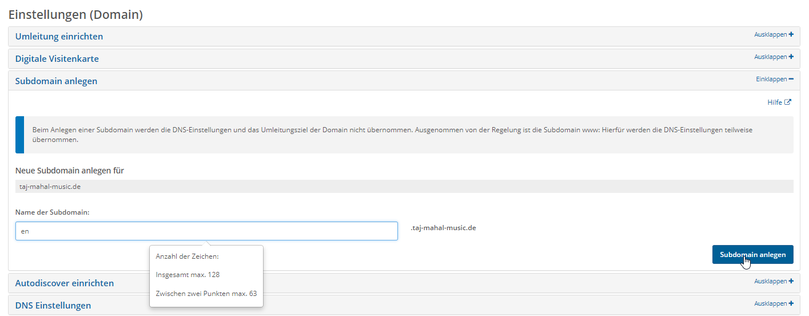


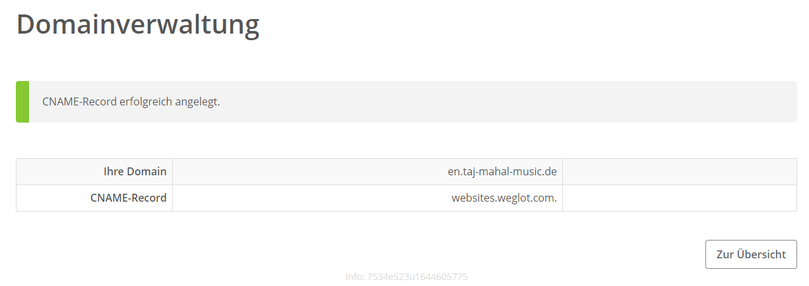

Subdomains set up ready
Back to Weglot:
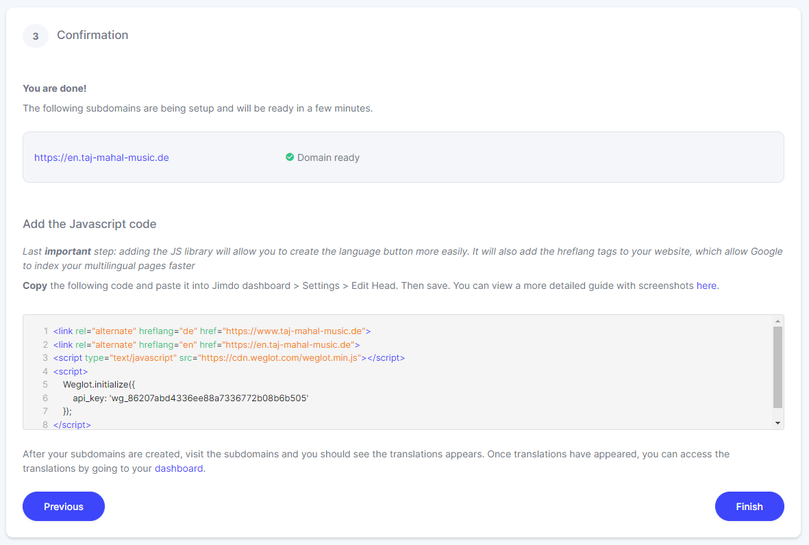
Insert Weglot into Jimdo Website
Head area (Menu > Settings > Edit Head > entire website/subpages)
To complete the configuration of the Weglot widget, the only last step is to use the Weglot widget on the Jimdo site. To do this, Weglot provides a script that can be which can be called up on the setup page in the Weglot dashboard:


Detail - View Info:
This script must be inserted in edit mode in the head area on the Jimdo page (menu > settings > edit head > entire website/subpages) (...preferably at the very bottom or below any existing entries).
After that, the Weglot widget is available on the Jimdo page and can already be operated in visitor mode. Further settings can now also be made, such as:
- the positioning of the translation buttons(see below)
- Any necessary adjustments to the translations(video)
- Translations of dynamic content(video)
Position Weglot widget on Jimdo page
Example: Translation buttons in the Jimdo menu
-
Prepare design
Most Jimdo designs are optimised for mobile views. In order to place the translation buttons in the menu of the website, they have to be placed in two different places in the design. so that they appear in both view modes (mobile and desktop).
Weglot provides a tool for inserting the buttons: the "Visual Editor". In order for the buttons to be inserted in the "Visual Editor" in the correct/desired places, the mobile menu the mobile menu as well as the menu of the desktop view have to be prepared for the inclusion of the translation buttons. For this purpose, we have added website, we have added a placeholder to the Jimdo design for each of the different menu versions using a jQuery script.
The script is simply inserted above the Weglot script in the head area of the website. After clearing the browser cache (hard reload), the placeholders are then visible in the Weglot "Visual Editor" and the buttons can be inserted/placed in the desired positions.

jQuery script for placeholders
- The jQuery code* for this in our example is as follows:
<script src="https://code.jquery.com/jquery-2.2.4.js" type="text/javascript"></script>
<script type="text/javascript">
$(document).ready(function () {
// Weglot Placeholder mobil/Desktop einsetzen
$('.jtpl-navigation__inner').after('<div class="weglot_placeholder"> weglot_placeholder </div> ');
$('.jtpl-mobile-topbar').after('<div class="weglot_mobile_placeholder"> weglot_mobile_placeholder </div> ');
});
</script>
*...die Beschriftungen der Placeholder später ausblenden mit <!-- weglot_placeholder --> bzw. <!-- weglot_mobile_placeholder ..> oder löschen!
- Start Visual Editor (Weglot Dashboard)

- Set up assignment for translation buttons

- The final positioning of the placeholders is done via a CSS script, which is also used in the head area of the web page.